Building a Better Social Media Plan: Evaluating the Wisocial Strategy PPT Template
Presenting a social media strategy often feels like balancing two worlds. On one hand, the content needs to be data-driven, covering audience insights, competitive landscapes, and measurable KPIs. On the other hand, the delivery must be visually compelling enough to hold attention during a pitch or stakeholder meeting. This is where a specialized presentation template, such as the Wisocial Social Media Strategy PPT, enters the conversation. It promises a structured, professional framework designed specifically for marketing strategies. But how does it actually perform in practice, and what should you consider before committing to a dedicated template over other methods? This article explores the distinct qualities of the Wisocial deck, compares it with alternative approaches, and examines the tradeoffs to help you decide if it fits your workflow.
What Makes a Strategy Presentation Distinct?
Before evaluating any specific tool, it is important to understand what a social media strategy presentation requires. A generic presentation might look polished but fail to guide the audience through a logical progression from objectives to execution. A truly effective strategy deck walks viewers from the why to the how to the what and the when. It includes not just beautiful visuals, but also a coherent narrative that covers audience analysis, platform selection, content planning, risk assessment, and measurement.
The Wisocial Social Media Strategy PPT positions itself as more than just a set of attractive slides. It is tailored specifically for this narrative flow. Instead of forcing a marketer to adapt their strategy to a generic template, it provides a ready-made structure for the entire pitch or planning session. The inclusion of specific sections such as Audience Analysis, Competitive Audit, Risks and Mitigation, and a Timeline and Roadmap suggests that the template was designed by someone who understands the strategic thinking required in modern social media marketing.
The Core Features and Structure of Wisocial
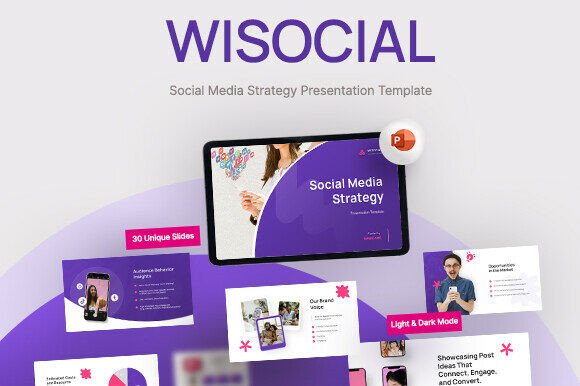
What sets Wisocial apart from a standard slide deck found on a generic template site is its depth and focus. It includes 30 unique slides, which is substantial for a strategy deck. This allows for a thorough presentation without the user needing to invent new layouts for every data point or insight.
Beyond Aesthetics: The Strategic Narrative
The slide sections are organized to tell a complete story. It moves from Objectives and Goals into Audience Analysis, then into competitive positioning and Platform Selection. This sequence is logical and persuasive. For example, an agency pitching a plan to a retail client can use the Competitive Analysis slide to visually demonstrate gaps in the market, and then immediately pivot to the Content Strategy section to show how those gaps will be filled.
The template also includes practical elements like device mockups, charts, and data visualizations. These are not merely decorative. A mockup of a mobile screen showing a proposed ad campaign makes the content feel real and actionable. Similarly, the KPIs and Measurement section likely includes placeholders for metrics like engagement rates, share of voice, or conversion data, which adds credibility to the proposal. The availability of both Light and Dark Mode is a thoughtful touch, allowing the presenter to match the deck’s mood to the brand identity or the presentation environment.
How It Compares to Other Presentation Approaches
When evaluating the Wisocial template, it is helpful to compare it against the common alternatives professionals typically consider.
Wisocial vs. Generic Stock Templates
Generic templates are widely available, often at low cost or even free. They can be visually appealing but they are not context-aware. A beautiful slide with a world map or abstract shapes might look professional, but it does not help the presenter structure their strategic thinking. Using a generic template often means spending hours reworking the slide layout to fit specific needs like a Content Calendar or a Social Listening Tools slide.
With Wisocial, the thinking has already been done. The layouts are pre-designed for marketing use cases. The tradeoff is upfront cost and specificity. A generic template is cheaper and more flexible for unrelated topics, but for social media strategy, a specialized template saves significant time and ensures nothing crucial is overlooked.
Wisocial vs. Custom-Designed Decks
Custom design is the gold standard for brand differentiation. A large agency might have an in-house design team that builds every slide from scratch. This offers unlimited flexibility and perfect brand alignment. However, custom design is expensive and time-consuming. It can take days or weeks to design and refine a 30-slide deck from scratch.
The Wisocial PPT offers a practical middle ground. It provides a professional, cohesive design system that is fully editable. Using Master Slides, a user can apply their own brand colors, fonts, and logos quickly. For a small business, a freelancer, or a mid-size agency, this balance of professional quality and efficiency is often the deciding factor. You sacrifice total uniqueness for a reliable, high-speed workflow.
Wisocial vs. Written or Internal Strategy Documents
Some teams prefer to keep their strategy in a written document, a long-form Google Doc, or a project management tool like Notion or Asana. These formats are excellent for collaboration and detail. They allow for extensive notes, links, and real-time updates. However, they are poor substitutes for a live presentation.
A slide deck is designed for persuasion and alignment. When pitching to a client or presenting to executives, visual storytelling is crucial. The Wisocial template is optimized for this moment. It translates dense strategy into digestible, visual chunks. The tradeoff is that a slide deck is less detailed than a written document. As a best practice, many professionals use the Wisocial template for the presentation itself, and provide a separate detailed document as a leave-behind or appendix.
Practical Strengths and Real-World Tradeoffs
Every tool has its ideal use case and its limitations. Understanding these helps you make an informed decision.
Where the Template Excels
- Speed of Deployment: If you have a tight deadline, this template is invaluable. You can populate the 30 slides with your data and insights in a few hours rather than a few days.
- Comprehensive Structure: The inclusion of slides like Risks and Mitigation and Platform Selection forces a thoroughness that many presenters skip. This can impress sophisticated clients and help your team think more holistically.
- Professional Visuals: The infographics, charts, and device mockups elevate the perceived quality of the work. For a freelancer or small agency, this helps compete with larger firms on presentation quality.
- Easy Customization: Because it uses Master Slides and free fonts, making global changes is straightforward. You can add your logo once and it propagates through the deck.
Understanding the Limitations
- PowerPoint Dependency: The file is provided as a .PPTX file. While widely used, this format is not native to Google Slides or Apple Keynote. If your team is exclusively cloud-based or uses Macs, converting the file may break some formatting or require extra work.
- Framework Rigidity: A template, by its nature, provides a structure. If your approach to social media strategy is highly unconventional, you may find yourself fighting against the template rather than being helped by it. The solution is to delete slides that do not fit or add new ones, which requires a little more effort.
- No Content Assistance: The slide deck is a container, not a content machine. You still need to perform the strategic work. The template helps you present your audience insights and KPIs, but it does not generate them. It works best when paired with solid marketing expertise.
Making the Right Choice for Your Context
Deciding whether the Wisocial Social Media Strategy PPT is the right fit depends on your specific role, team size, and project requirements.
Ideal Use Cases
- Client Pitches: For digital agencies or consultants pitching proposals, the combination of a strategic narrative and polished visuals is highly effective. It shows you have a method and you take presentation seriously.
- Internal Strategy Workshops: Marketing teams can use the template to align on quarterly goals. The Timeline and Roadmap and KPIs and Measurement slides are excellent for getting everyone on the same page.
- Coursework or Training: Business educators and students can use the structured flow of the template to learn and teach the fundamentals of social media strategy.
- Freelancers: Building a portfolio or pitching a project solo can be challenging. Having a premium template like this levels the playing field against larger competitors.
When Alternatives Make More Sense
- When Collaboration is Key: If a dozen stakeholders need to edit the deck simultaneously, a cloud-native tool like Google Slides might be more practical. You would need to upload the Wisocial file to Google Drive, which may alter some of the complex formatting or font choices.
- When You Need Budget Optimization: For a one-off internal presentation with zero external audience, investing in any specialized template might be unnecessary. A basic theme, or even just white slides, can suffice for a quick team update.
- When Your Process is Highly Unique: If you follow a proprietary methodology that does not map to traditional sections like Competitive Analysis or Platform Selection, you might end up spending too much time adapting the template. In rare cases, starting from a blank canvas is more efficient.
Ultimately, the decision comes down to the value of time versus flexibility. For most marketing professionals, a template like Wisocial removes the friction of designing a strategic narrative from scratch. It allows the user to focus on the substance of the strategy rather than the mechanics of the slide deck. It is a practical, time-tested solution for anyone who regularly needs to present social media plans in a compelling, professional manner.
When considering your options, look at the specific needs of your audience. If you need a complete, ready-to-use framework that helps you communicate complex ideas including audience data, campaign performance, and risk factors, a specialized PPT like this is a strong choice. If you prioritize total design freedom or a specific collaboration workflow, you may lean toward a different format. The key is to match the tool to the task, and for presenting a thorough social media strategy to a discerning audience, a dedicated template offers a clear advantage in structure, design, and efficiency.