Playful 3D Weather Icons Bundle: A Practical Tool for Modern Visual Communication
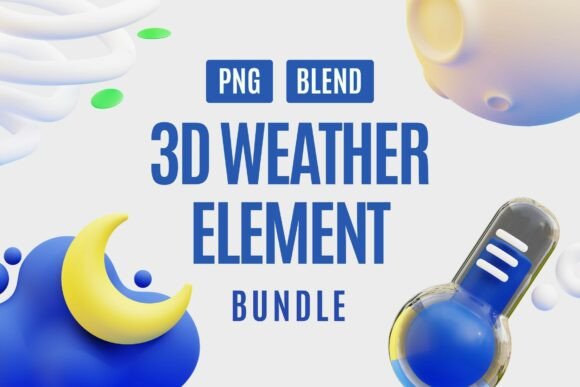
Weather icons are everywhere. They appear on dashboards, in mobile apps, on social media posts, inside email newsletters, and across countless educational materials. But most weather icon sets fall into one of two categories: flat and forgettable, or overly realistic and visually heavy. The Playful 3D Weather Icons Bundle sits in a sweet spot between these extremes. It offers a collection of twenty weather-themed 3D elements that combine smooth gradients, realistic lighting, and a bubbly aesthetic that feels both professional and approachable.
Whether you are designing a weather app, building an infographic, producing content for social media, or creating teaching materials for a classroom, this bundle gives you a consistent visual language that works across digital and print environments. Each icon comes as a PNG file with a transparent background, which means you can drop it into any project without spending time on masking or cutting out backgrounds. The bundle also includes BLEND files, giving you the flexibility to adjust lighting, colors, or composition if you work in Blender.
What This Bundle Actually Contains
Before discussing how to integrate these icons into your workflow, it helps to understand exactly what you are getting. The bundle includes twenty individual 3D weather elements. You will find sunny skies, rainy clouds, snowy scenes, windy effects, and various transitional weather states. Each icon is rendered with soft 3D lighting and a balanced color palette that avoids garish saturation. The transparent PNG format means the icons are ready to use immediately in design tools like Figma, Canva, Adobe Photoshop, Adobe Illustrator, Keynote, or even Microsoft PowerPoint.
The inclusion of BLEND files is a notable advantage for anyone who works in 3D pipelines. If you need to match a specific lighting condition in your scene, you can open the source files, tweak the lighting, adjust the camera angle, or change materials. This level of access is rare in ready-made icon bundles and adds significant value for designers who need customization beyond what a static PNG can offer.
Where These Icons Fit in a Real Workflow
Visual assets like these are not standalone products. They are components within a larger process. Understanding where they fit helps you use them more effectively. The Playful 3D Weather Icons Bundle is most useful during the production and polish phases of a project. When you have already established your layout, typography, and core visual direction, these icons serve as finishing elements that add depth and personality.
For example, imagine you are designing a weekly weather dashboard for a mobile app. You have your layout ready, your data streams connected, and your color scheme defined. What is missing is the visual representation of each weather condition. Instead of spending hours modeling and rendering clouds, suns, and raindrops from scratch, you can import these icons directly into your design tool. The transparent background means they layer cleanly over your interface elements. The consistent lighting and color balance ensure they do not clash with the rest of your design.
In an educational context, these icons can be used during the content creation phase. If you are building a science lesson about weather patterns, you can place these 3D icons alongside explanatory text to create visual anchors for students. The playful style reduces the intimidation factor of scientific topics and makes the material more engaging for younger audiences.
For social media content creators, these icons work well both before and after the main content creation process. You can use them as visual references to plan a post layout, or you can insert them directly into the final graphic. Because the icons are 3D with realistic lighting, they stand out in feeds dominated by flat illustrations and stock photography.
Integration With Tools and Platforms
One of the strengths of this bundle is its compatibility with common design and productivity tools. The PNG format is universal. You can drag and drop these icons into Canva designs, Figma frames, PowerPoint slides, Google Slides, or any other application that supports image layers. The transparent background eliminates the need for manual masking, which saves time and reduces the risk of visible cutout edges.
If you use Blender regularly, the BLEND files give you a significant advantage. You can open the source scene, adjust the environment lighting to match your existing render, or even rig the icons for animation. This is particularly useful for motion designers who want to create animated weather transitions. Instead of animating a flat 2D icon scaling up and down, you can rotate the 3D cloud in space, change the sun's glow intensity, or make raindrops fall naturally. The source files give you that flexibility without requiring you to build everything from scratch.
For UI and UX designers working in Figma or Sketch, these icons can be nested inside components and variants. You can create a weather component that swaps different icons based on user input or data state. The consistent visual style across all twenty icons ensures that the component library remains visually coherent.
Practical Implementation Tips
To get the most value from this bundle, consider a few practical strategies before you start dropping icons into your projects.
Organize your assets upfront. When you download the bundle, you will receive twenty PNG files and twenty BLEND files. Create a folder structure that makes sense for your workflow. For example, you might group icons by weather category: clear, cloudy, rainy, snowy, windy, and mixed. Alternatively, you could organize them by project name if you are working on multiple initiatives simultaneously. A few minutes spent on organization now will save you time when you are under deadline pressure later.
Check resolution and sizing. The PNG files come at a fixed resolution. Before you use them in a large format print project or a high-resolution screen design, test the icon at your target size. If you need to scale up significantly, the BLEND files give you the option to re-render at a higher resolution. This is one of the main reasons the BLEND files are valuable. Static PNGs have limits; source files do not.
Match lighting conditions. The icons are rendered with soft, neutral lighting. This works well in most contexts. However, if your project has a very warm or very cool color temperature, you might notice a slight mismatch. In that case, open the BLEND file and adjust the environment lighting to better match your scene. This is a quick process and yields a much more polished final result.
Combine with other asset types. These 3D weather icons pair well with flat UI elements, gradients, and even photography. Because the icons have a playful, bubbly style, they can soften the look of a minimalist interface or add energy to a text-heavy page. Avoid placing them alongside other highly detailed 3D assets that have a different lighting setup, as the contrast in light direction will be noticeable.
Maintaining Consistency and Quality Control
When you use pre-made assets across multiple projects, consistency becomes a concern. The Playful 3D Weather Icons Bundle solves this problem internally because all twenty icons share the same rendering style, color palette, and lighting setup. As long as you use the icons as delivered, your designs will maintain visual coherence.
However, if you customize the BLEND files for one project, be careful not to introduce variation that will cause inconsistencies when you reuse those icons elsewhere. A good practice is to keep a master copy of the original bundle unchanged. When you need to customize a file, duplicate it and work on the copy. That way, you always have the originals to fall back on.
For teams working on shared design systems, establish a naming convention for the icons early. If everyone on the team uses the same file names and folder structure, the icons will be easy to find and replace when updates are needed. This is especially important if you version your design system over time.
Long-Term Usability and Asset Lifecycle
One question that comes up with any icon bundle is how long it will remain useful. Design trends shift, and what feels modern today might feel dated in a few years. The Playful 3D Weather Icons Bundle uses a style that is deliberately broad: smooth gradients, soft lighting, and rounded forms. These characteristics have staying power because they are rooted in fundamental principles of visual appeal rather than trend-driven details.
The transparent PNG format will remain usable for the foreseeable future. Every major design tool supports PNG files, and that is unlikely to change. The BLEND files are tied to Blender, which is a free and actively maintained open-source application. As long as Blender continues to be developed, the BLEND format will remain accessible. If you ever need to migrate to a different 3D tool, you can export the geometry and materials from Blender using standard interchange formats like OBJ or FBX.
If you archive your projects properly, these icons can be reused years later without degradation. Store the original bundle files in a location that is backed up and accessible. When you start a new project that requires weather visuals, pull from this bundle first before searching for new assets. Over time, the bundle will pay for itself many times over in time saved and consistency gained.
Who Benefits Most From This Bundle
UI and UX designers will find these icons particularly useful for interface elements, app prototypes, and dashboard designs. The 3D style adds depth without requiring complex code or heavy rendering. Content creators and social media managers can use these icons to produce visually engaging posts that stand out in crowded feeds. Educators and instructional designers can incorporate them into presentations, worksheets, and digital lessons to make abstract weather concepts more concrete and memorable.
Freelancers and small business owners who produce their own marketing materials will appreciate the immediate professionalism these icons bring. Instead of using generic clip art or flat emojis, you can insert a polished 3D icon that communicates care and attention to detail. For bloggers and publishers who cover weather, travel, outdoor activities, or lifestyle topics, these icons provide a visual shorthand that readers recognize instantly.
Even hobbyists who create personal projects like event invitations, custom calendars, or home organization printables can use these icons to elevate their work. The bundle is priced for professional use, but its value extends to anyone who wants better visuals without learning 3D modeling from scratch.
The Playful 3D Weather Icons Bundle is not a tool that fundamentally changes how you design. It is a reliable, well-crafted set of visual components that saves you time, ensures consistency, and adds a touch of personality to your projects. When you need to represent weather conditions in a way that is clear, friendly, and visually polished, this bundle gives you exactly what you need—nothing more, nothing less.