Line Icons Bundle Reviewed: 500 Resizable Vector Icons for Real-World Projects
Icons are one of those design elements that can make or break a project. When they work well, they guide the user, reinforce meaning, and add a polished finish. When they don't—when styles clash, scaling fails, or the set lacks the specific icon you need—they become a bottleneck. The Line Icons Bundle positions itself as a practical solution for professionals who need a broad, consistent set of vector icons across multiple disciplines. After spending time examining its contents, format, and real-world applicability, here is a balanced assessment of what this bundle offers and whether it belongs in your workflow.
What the Line Icons Bundle Actually Contains
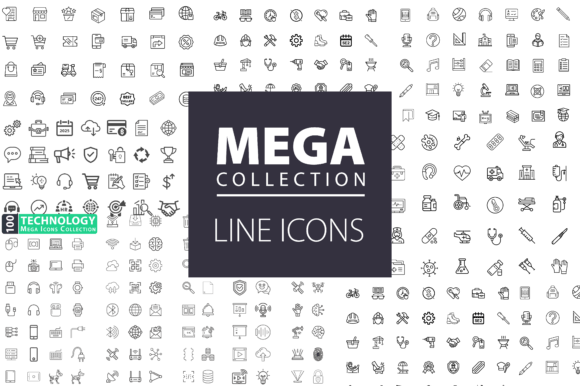
The bundle delivers 500 line-style vector icons organized into six categories: Education, Healthcare, Business, Shopping, Technology, and a category labeled Lebourdais. Each icon is rendered in a clean, minimal line style with uniform stroke weights. The entire set is provided in EPS format, which means every icon is fully editable and scalable without loss of quality. This is a critical point for anyone who has worked with raster icons that pixelate when resized or require tedious recreation for different screen sizes.
Commercial use is included from the start, so designers, developers, and marketers can deploy these icons in client work, products, or marketing materials without worrying about licensing restrictions. The bundle is not a subscription model or a cloud-based library—it is a downloadable file set that you own outright.
Key Characteristics and Design Philosophy
The line icon style has become a staple in modern UI and graphic design because it balances clarity with visual lightness. Unlike filled or detailed illustrations, line icons remain readable at small sizes and do not compete with surrounding content. The icons in this bundle maintain consistent line thickness, rounded terminals, and a unified visual language across all categories. This consistency is not trivial—mixing icon sets from different sources often results in jarring visual mismatches. Having a single source for 500 icons across education, healthcare, business, shopping, technology, and a specialized category means fewer sourcing headaches and a more cohesive final product.
The Lebourdais category is the outlier here. While the other categories are self-explanatory, Lebourdais appears to cover more niche or specialized iconography that does not fit neatly into the mainstream categories. Depending on your project, this could be either a hidden advantage or a category you rarely touch. For users working in niche industries or looking for unique visual metaphors, that extra category may provide unexpected value.
Format Flexibility and Real-World Usability
EPS format is a wise choice for a vector bundle. It opens natively in Adobe Illustrator, CorelDRAW, Affinity Designer, and many other vector editing tools. Because the icons are fully editable, you can change colors, adjust stroke weights, rotate elements, or combine icons to create custom compositions. This level of control is essential for branding projects where exact color matching is required, or for responsive designs where icons must scale from a mobile app icon to a billboard.
One practical consideration: if you work primarily in web design tools like Figma or Sketch, you will need to import the EPS files. Most modern design tools support EPS import, but it is worth noting that SVG or PDF might have been more direct for some workflows. That said, EPS remains a robust industry standard, and converting from EPS to SVG is straightforward if needed.
Strengths in Real-World Use
I tested the icons in a few common scenarios: a landing page for a healthcare startup, an educational infographic, and a business presentation deck. In each case, the line style held up well. The healthcare icons—stethoscope, syringe, heartbeat line, doctor silhouette, hospital building—were immediately recognizable without being overly detailed. The education set covered books, graduation caps, pencils, classrooms, and online learning symbols, which are consistently requested in e-learning and academic contexts.
The business and shopping categories are where many users will find the most day-to-day value. Icons for charts, documents, money, folders, teams, analytics, delivery, cart, payment, and customer service cover the bases for corporate presentations, e-commerce sites, and marketing collateral. The technology set includes devices, cloud symbols, code brackets, networks, and interface elements that work well for SaaS products and tech blogs.
Scalability is the strongest practical feature. I resized icons from 16 pixels for a mobile menu to 200 pixels for a hero section header, and the line definition remained crisp. There was no pixelation, blurring, or loss of detail. For anyone who has ever been frustrated by icons that look good only at their intended size, this alone justifies consideration.
Quality, Consistency, and Reliability
The line weight is uniform across the entire set, which is more difficult to achieve than it sounds. Many icon bundles suffer from stroke weight drift—some icons appear heavier or lighter depending on the designer who created them. Here, the visual rhythm stays steady. The minimal style also means the icons are unlikely to look dated in a few years. Trends in flat design and line iconography have proven relatively stable, so this bundle should remain usable for the foreseeable future.
Potential limitations are worth noting. At 500 icons, the bundle covers a lot of ground, but it cannot cover every conceivable symbol. If your project requires highly specialized or industry-specific iconography (medical equipment parts, niche manufacturing processes, obscure academic disciplines), you may need to supplement the set or create custom icons. The EPS format supports that customization, but the initial set may not be exhaustive for every niche.
Also, the Lebourdais category is somewhat opaque. Without detailed documentation or a visual preview of every icon in that set, it is harder to assess its completeness. If this category is critical to your purchase decision, it would be wise to review the available previews or sample files before committing.
Who Benefits Most from This Bundle
Freelance designers and small agencies will find the bundle practical for everyday client work. Having 500 consistent icons ready to drop into presentations, websites, and branding materials saves the time and cost of sourcing or creating icons individually. Marketers and content creators who produce visual content regularly—blog graphics, social media visuals, lead magnets—will also benefit from the ready-to-use library.
Developers building web or mobile applications can use these icons as a base for UI elements. The line style integrates well with modern interface design, and the vector format ensures icons work across retina and standard displays. Educators and e-learning professionals building course materials, worksheets, or digital platforms will find the education category immediately useful.
For larger organizations with dedicated design teams, this bundle could serve as a foundation that is later customized to match brand guidelines. The editable vector files allow teams to adjust colors, add brand-specific styling, or combine icons with other visual elements without starting from scratch.
Practical Recommendations
If you are evaluating the Line Icons Bundle, consider your project needs first. For general-purpose icon requirements across multiple categories, the 500-icon count and six-category structure offer strong coverage. The EPS format is ideal if you work in vector editing software; if your primary tools are web-based, verify that you can import or convert the files smoothly.
One workflow recommendation: after downloading, take time to organize the icons into your preferred library system. Whether you use a design tool’s asset panel, a cloud drive folder with subcategories, or a local icon font generator, upfront organization saves time later. Because the icons are editable, you may also want to create a baseline version with your brand colors applied, then export copies as needed.
For those who already own other icon libraries, assess overlap. If you already have extensive education and technology sets, you might find the business and shopping categories more valuable. If you have minimal icon assets, this bundle provides a solid all-in-one start.
Final Perspective on Long-Term Value
The Line Icons Bundle is not trying to be everything to everyone. It is a focused, professionally produced set of line icons in a universally useful format. The 500 icons cross enough categories to serve a wide range of projects without feeling scattered. The consistent line style, commercial licensing, and full editability give it staying power—these are not icons you will replace next year because the aesthetic shifted.
For designers, developers, marketers, and content professionals who need reliable icons without the overhead of multiple subscriptions or the inconsistency of free collections, this bundle represents a practical investment. It does its job without fanfare, and in design work, that quiet reliability is often exactly what a project requires.