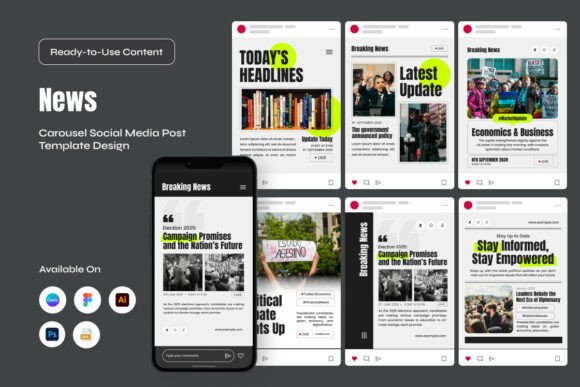
Breaking News Instagram Carousel Pack: Real-World Ways to Elevate Your Newsroom on Social Media
When a story breaks, the first few hours are everything. You need to get information out fast, but you also need it to look credible, polished, and worthy of attention. That is where having a solid template system makes all the difference. The Breaking News Instagram Carousel Pack is exactly what it sounds like: a set of ready-to-use slide layouts designed to help journalists, media teams, and content creators share breaking stories with clarity and visual authority. But instead of just listing what comes inside the file, let us walk through how this tool actually works in the hands of different people, in different situations, and for different kinds of stories.
What This Pack Actually Brings to the Table
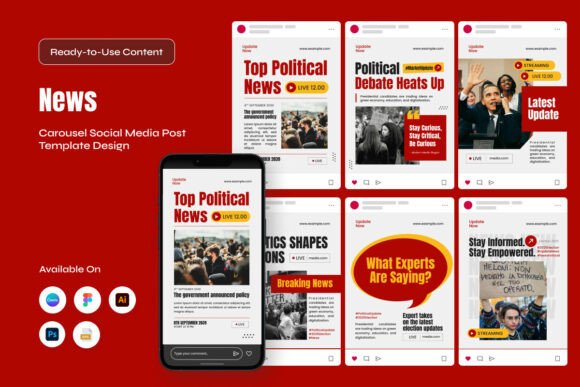
At its core, this is a collection of six different layout designs, each available in two size variations: the standard Instagram square-ish portrait at 1080 by 1350 pixels, and the full-screen vertical format at 1080 by 1920 pixels. That means you get twelve distinct slide templates right out of the gate. Every element inside these files is editable, from the text and colors to the placement of objects. You can open them in Adobe Illustrator, Photoshop, Canva, Figma, or any software that supports EPS files. The fonts are free, and the download includes a handy font info document so you never have to hunt around for missing typefaces. One important detail: the preview images you see on the product page are just for show. The actual download contains the working templates, not the stock photography.
Now, let us set the features aside and talk about where this kind of tool actually shines.
For the Solo Blogger or Independent Journalist
Imagine you run a local news blog covering city council meetings, school board decisions, and community events. You are a team of one, maybe two people. When something urgent happens, like a major road closure or a weather emergency, you need to get the word out before the bigger outlets even finish their morning coffee. With a carousel pack like this, you do not waste time thinking about layout or design. You open the file, swap in your headline, drop in a relevant statistic or quote, and export. The whole process takes minutes instead of hours.
What you gain here is consistency. Your audience starts to recognize your visual style. They know when they see that clean, newsroom-ready layout that the information is current and vetted. That builds brand trust over time, which is hard to earn when you are a small operation competing against established names. The fact that the templates are fully editable means you can also tweak the color palette to match your blog's branding. Maybe you use a warm accent color for human-interest stories and a cooler tone for hard news. That kind of flexibility matters when you are trying to carve out a distinct identity.
For Social Media Editors in Larger Newsrooms
Working in a media team means you have multiple reporters feeding you updates throughout the day. You might have one person covering a press conference, another monitoring a developing situation across town, and a third handling live updates from a court hearing. The Breaking News Instagram Carousel Pack becomes a shared resource that keeps everyone on the same page visually. Instead of each editor designing their own slide from scratch, the team uses a unified template set. This ensures that no matter who posts the update, the aesthetic remains consistent with the outlet's brand guidelines.
One practical scenario here is covering election night. Results come in waves, often late into the night. You need to push out candidate updates, vote percentages, and key race calls quickly. The carousel format lets you package multiple data points into a single post that users can swipe through. Slide one carries the headline and a strong visual. Slide two breaks down the numbers. Slide three offers context or a quote. By the time the user finishes the carousel, they have a full picture without ever leaving Instagram. That is efficient storytelling, and it keeps your audience engaged longer than a single static image ever could.
For Nonprofit Organizations and Advocacy Groups
Breaking news is not only about politics or crime. It can also mean a sudden policy change, a natural disaster, or a public health announcement. Nonprofits often need to communicate urgent information to their supporters, volunteers, or the communities they serve. If your organization works in disaster relief, for example, you might need to share real-time updates about shelter locations, supply distribution points, or safety guidelines. A carousel pack designed for news delivery helps you present that information in a way that feels authoritative and calm. The structured layouts prevent you from accidentally burying critical details in a wall of text.
Another use case here is advocacy campaigns. Suppose a new bill is introduced that directly affects your cause. You have a narrow window to educate your followers and mobilize action. The carousel allows you to explain the issue slide by slide: what the bill does, who it impacts, what your organization is doing, and how people can help. Each slide is a self-contained unit of information, so users can absorb it at their own pace. That structure is far more effective than a single post that tries to say everything at once.
For Content Creators and Influencers Covering News
These days, many independent creators build their following by commenting on current events. Whether you cover tech launches, entertainment industry updates, or viral social media moments, your audience expects timely and visually appealing content. The Breaking News Instagram Carousel Pack gives you a shortcut to producing that kind of material without needing a design background. You can focus on the commentary and analysis while the templates handle the layout.
Let us say a major product announcement just happened. You want to break down the announcement into key takeaways for your followers. Slide one shows the product name and launch date. Slide two highlights the most exciting feature. Slide three addresses a potential drawback or controversy. Slide four gives your personal take. By structuring your content this way, you encourage swipes and increase the time people spend on your post. That signals to the algorithm that your content is valuable, which can boost your reach. Plus, having a consistent visual style makes your profile look more professional, which can attract sponsorship opportunities down the line.
Different Industries, Different Needs
The beauty of a tool like this is that it does not lock you into one type of content. A local news station might use it for traffic alerts and weather warnings. A sports media page might adapt it for trade deadline updates or injury reports. A financial news account could use it to summarize market movements or earnings reports. Even a university communications department could use it to announce campus closures or emergency procedures. The layouts are neutral enough to fit a wide range of tones, from urgent and serious to informative and upbeat.
One observation worth noting: the 1080 by 1920 vertical format is especially useful for Instagram Stories and Reels, where full-screen visuals dominate. The 1080 by 1350 option works better for the main feed, where users scroll past posts quickly and need a strong thumbnail to stop their finger. Having both sizes in the same pack means you are covered no matter where you post. That kind of flexibility is rare in template sets that only offer one aspect ratio.
What to Consider Before You Start Using It
No tool is perfect for every situation, and it helps to go in with realistic expectations. The Breaking News Instagram Carousel Pack gives you the structure, but it does not write the content for you. You still need to craft clear, accurate headlines and decide which information matters most. The templates will guide the eye, but they cannot fix weak copy or misleading data. Also, because all images used in the preview are not included, you will need your own photography or access to a stock image service. If you do not have a library of relevant visuals, you might find yourself spending extra time sourcing images that fit each story.
Another consideration is brand customization. While the files are fully editable, you do need a basic comfort level with tools like Adobe Illustrator, Photoshop, Canva, or Figma. If you are used to Canva's drag-and-drop simplicity, you will be fine. If you are opening a PSD file for the first time, expect a small learning curve. The documentation helps, but it assumes you know your way around layer panels and color swatches. For teams, this is usually not an issue. For a single user who is not design-savvy, it might take an afternoon to get comfortable.
One potential limitation is that the pack contains six layout designs. That is enough variety to avoid monotony, but if you post breaking news multiple times a day, you might cycle through them quickly. You could always create your own variations by mixing elements from different layouts, but that requires a bit more design work. For most users, six distinct designs are plenty, especially when you consider that you can adjust colors and fonts to create further differentiation.
Strengths That Make a Difference
The strongest aspect of this pack is how it balances flexibility with speed. You can open a file, make a few edits, and export a professional-looking carousel in under ten minutes. That speed is critical when news is breaking and your audience is refreshing their feed every few seconds. Another strength is the cross-platform compatibility. Not every template set works seamlessly across Adobe software, Figma, Canva, and EPS viewers. This one does, which means you are not locked into any single ecosystem. If your workflow changes or you switch tools, your templates come with you.
Then there is the usability aspect. The fact that the fonts are free and documented removes a common headache. Many template users have experienced the frustration of opening a file only to find missing fonts that cost money or require a lengthy download. This pack sidesteps that issue entirely. The inclusion of both RGB color mode and print-friendly EPS files also means you can repurpose the same templates for web use and, if needed, for print materials like flyers or posters. That kind of crossover utility is rare in products designed specifically for Instagram.
Final Thoughts on Making It Work for You
The Breaking News Instagram Carousel Pack is not a magic bullet that will instantly grow your audience or make your writing better. What it does is remove a significant barrier between you and a polished, trustworthy post. When every second counts, having a reliable template system means you spend your energy on the story itself rather than on the design. Whether you are a one-person blog, a nonprofit communicator, a social media editor in a bustling newsroom, or a creator trying to keep up with the news cycle, this pack gives you a foundation that looks serious and intentional.
The real value comes from how you use it. Consistent visual branding, clear information hierarchy, and thoughtful slide sequencing will set your breaking news apart from the noise. If you pair these templates with strong headlines, accurate data, and a genuine understanding of what your audience needs, you will deliver stories that not only get seen but also trusted. And in the world of breaking news, trust is everything.